Know the moment an agent needs you · approve, refuse or talk to it from anywhere
Scroll
Connects directly to
your coding app
Claude Code · Codex · Google Antigravity · Cursor
Your coding buddy
Pixli Pocket
€99 early bird · then €199
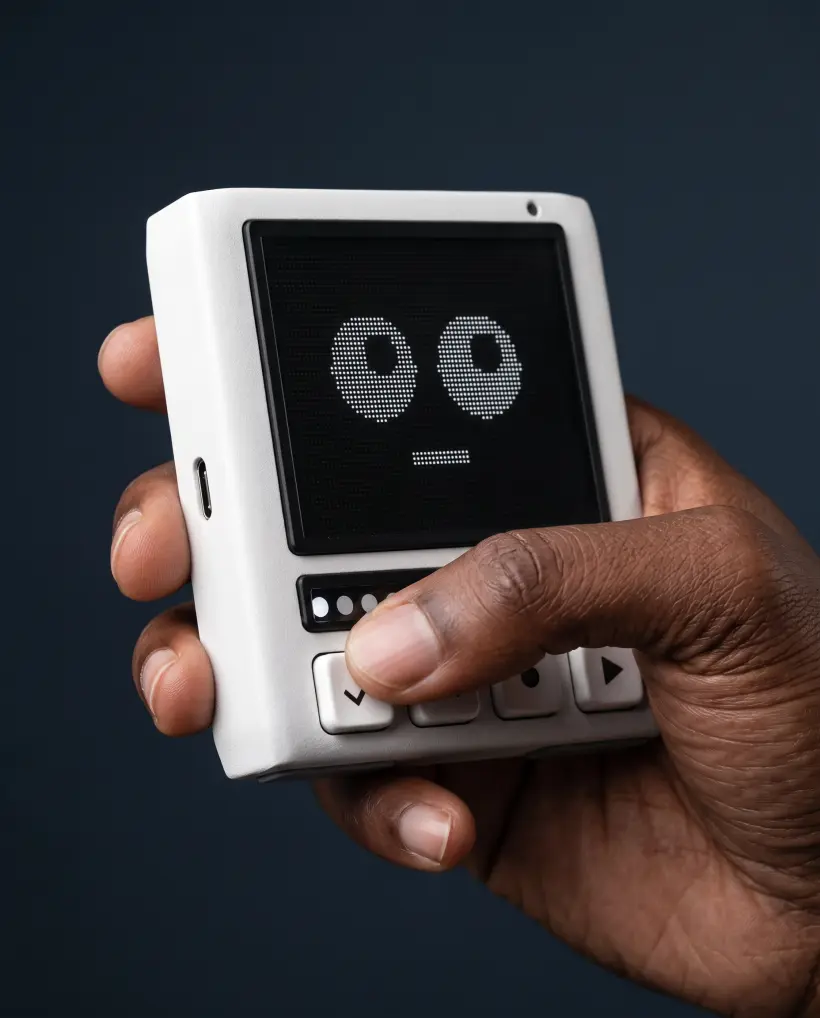
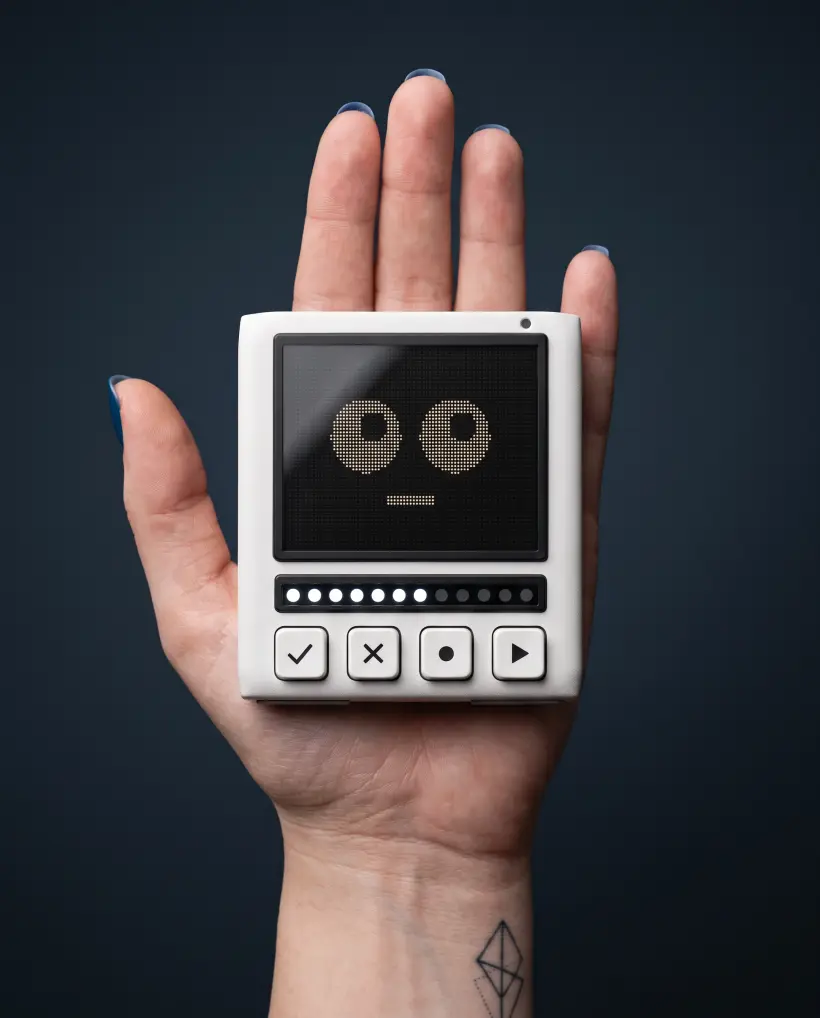
Pixli is your own customizable pocket robot that connects directly to
your coding agents. Pixli will alert you and let you manage your coding
agents from wherever you are. You can also redirect agents with Pixli's
built-in microphone.
No payment today. Reserving holds the €99 early bird price
and your place in the first production run.
Read the statusWhat it is doing, right now
Every tool call lands on the screen, newest at the bottom.
READ PKG.JSON. BASH NPM TEST. Enough to tell progress from
a loop.
Approve a commandHold ✓ for one second
The command shows up in full. The real one, RM -RF BUILD/. Hold
the check key and the bar fills. Let go early and nothing runs.
Or refuse itOne tap on the cross key
Tap ✕ and it is denied. The agent takes the refusal as its answer and
moves on, so the run never sits waiting for you.
Answer a questionFour options, four keys
Agents ask for more than yes or no. The options arrive numbered and
the keys pick between them. USE WHICH DB? Postgres.
Talk to itFrom the next room
Hold ▶ and say what you want changed. "Skip the tests." Your
words reach the agent as its next instruction. No keyboard, no
desk.
See what it is costingTokens, context, spend, rate
Tokens burned, how full the context window is, spend so far, and how
fast it is going. The numbers that decide whether a run carries on.
One light per agentTwelve segments, one meaning
Point the bar at agents and each lit segment is one still running.
Point it at tokens or spend and it fills as they climb.
It buzzesYou do not have to be looking
One short pulse the instant an agent blocks or fails. You feel it in
your hand, or hear it on the table, wherever you are.
01 / 08 · What it does
Run your agents & walk away
Agents are supposed to work while you don't. Pixli connects
to them and gives you complete oversight, letting you manage them from
wherever you are.
[01] · The keys
Your agent stops waiting on you
The commands an agent wants to run show up on the screen, the real ones, like rm -rf build/.
[02] · The microphone
Change what it's doing, from the couch
Hold ▶ and say it: “skip the tests”. Your words reach the agent as its next instruction.
[03] · The glyph bar
See what your agents are costing
A glyph bar you point at tokens, context left, spend or burn rate.
[04] · The face
You find out the moment it happens
Six faces, one per phase of a run. A short pulse the instant an agent blocks, finishes or fails.
Customize your Pixli
Set up your Pixli exactly how you want, with twelve keycaps
that ship in the box — and customize what each key does in the Pixli
Studio app.
Click a cap to turn it over
Pixli Pocket
Get complete oversight & control of agents anywhere you are
Buzzes & alerts you the moment an agent blocks or asks permission
Hold ▶ and redirect the agent with your voice
Customize your Pixli however you want
You're in. We'll email you before pre-orders open, and
nothing is charged until then.
No payment today. Reserving secures your place in the first
production run at the early bird price. We confirm your pack —
one Pixli, €99 — by email before anything
is charged.
Early bird price
Pixli goes wherever you go
Some early reviews from developers
Sarah
“I put it on the kitchen counter and made dinner. Three approvals later the branch was done. I have not sat watching a terminal spin since.”
Marcus
“I was fairly sure this was a gimmick. Then it buzzed while I was on the sofa, I held one key, said “skip the tests”, and went back to my book.”
Priya
“I did not expect to find it cute. It blinks at you. I got weirdly attached to a small robot in about a day.”
Tom
“I know exactly what my agents are up to from the garden. Never thought I would say that.”
Specifications
Body80 × 83 × 22 mm · matte moulded shell
Display2.8″ IPS · 320 × 240 · 80 × 60 dot matrix
Glyph bar12 segments · tokens, spend or agents
Keys4 × 10 mm · 1.3 mm travel · MX-compatible stem
Keycaps12 × PBT · laser-marked · all in the box
MicrophonePDM MEMS · push-to-talk
HapticsLRA · alerts you can feel
Battery≈11 h typical · USB-C charging
LinkBLE 5 · Pixli Bridge for macOS
Works withClaude Code · Codex · Google Antigravity · Cursor
Price€99 early bird · €199 after
How it gets made
Six stages. Three are done.
Design lockedEight revisions. Every dimension specified for tooling.Done
Software builtApprove, refuse and talk, running against live Claude Code and Codex
sessions.Done
Prototype builtThe first unit is assembled and going into testing.Done
ReservationsOpen now, at the early bird price.You are here
ToolingShell, keycap and stencil tools cut.We are here
Production, then shipCertified, boxed, and shipped in the order reserved.After that